Radio Communications — Speaking the Language of Aviation
The radio is your primary tool for sharing the sky with other aircraft and working with air traffic control. Good radio technique builds confidence, improves safety, and marks you as a competent pilot. This module teaches you everything from the phonetic alphabet through emergency declarations — with real-world scripts you can practice before your first flight. See our full radio communications guide →
- Recite the phonetic alphabet for all 26 letters without hesitation
- Apply the four-element radio call formula to any situation
- Demonstrate correct CTAF self-announcement scripts for non-towered airports
- Execute the full radio sequence for a towered airport from ground to landing
- Request and receive VFR flight following from an approach control facility
- Declare a MAYDAY emergency using correct phraseology
- Identify all four special transponder codes and when each applies
Lesson 1 — The Phonetic Alphabet and Number Pronunciation
The ICAO phonetic alphabet replaces letters with internationally standardized words — eliminating confusion between similar-sounding letters over radio (B/D/E/G/P/T/V all sound similar in poor radio conditions). Every pilot must know all 26 without hesitation. You use them constantly: aircraft identifiers, taxiway designations, ATIS information codes, clearances, and more.
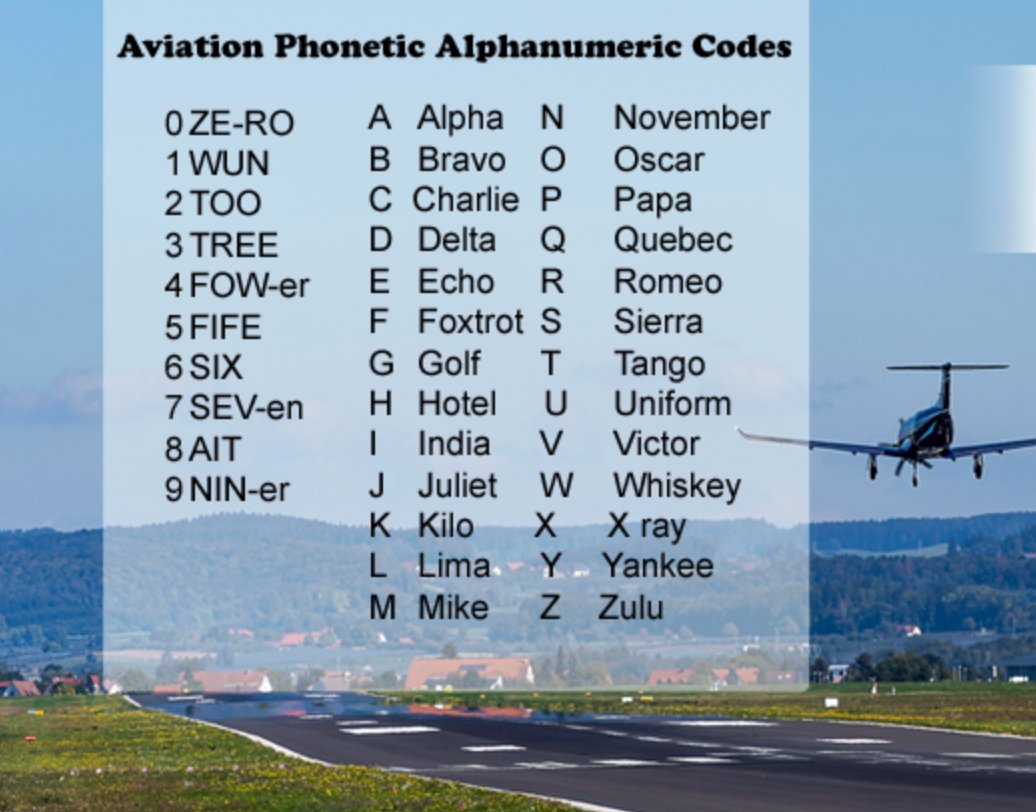
Number pronunciation
Aviation numbers are spoken digit-by-digit, not as compound numbers. The word "niner" is used for 9 to avoid confusion with the German "nein" (no). Several numbers have specific pronunciation rules:
- Runway 27 = "two-seven" (not "twenty-seven")
- Altitude 3,500 = "three thousand five hundred"
- Frequency 122.8 = "one two two point eight"
- Heading 090 = "zero niner zero" (always 3 digits)
- The number 9 = "niner"
- Time 1753Z = "one seven five three Zulu" (always UTC/Zulu)
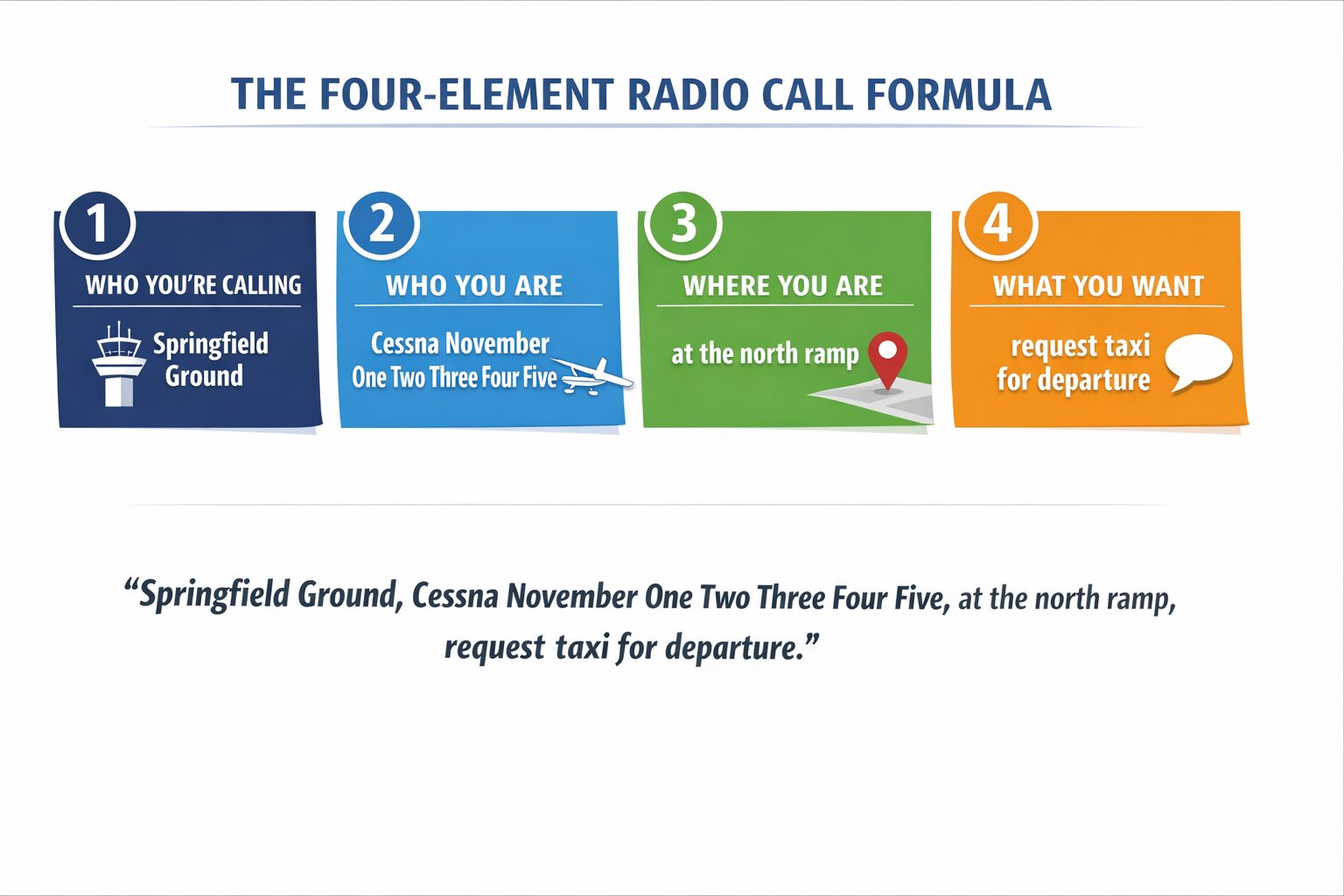
The four-element radio formula — use it every time:
(1) Who you are calling · (2) Who you are · (3) Where you are · (4) What you want
Example: "Springfield Ground, Cessna November One Two Three Four Five, at the ramp with information Bravo, request taxi for departure."
Every radio call you make should contain all four elements — in that order. After initial contact, controllers abbreviate your call sign to the last three characters. Once they do, you can too.
Why radio communication sounds the way it does
Aviation radio was developed in an era of poor-quality voice transmission — crackling static, engine noise bleeding into the microphone, atmospheric interference. The ICAO phonetic alphabet was designed to make each letter uniquely identifiable even in the worst conditions. "Bravo" and "Delta" cannot be confused even at 30% intelligibility. "B" and "D" over a bad radio connection absolutely can be.
Number pronunciation follows the same logic. "Niner" instead of "nine" prevents confusion with the German word "nein" (no) in international operations. "Tree" for three prevents confusion with "free" in some accents. "Fife" for five prevents confusion with "nine" in degraded audio.
Call signs — how to say your N-number correctly
Your aircraft's call sign is the N-number on the tail. On initial contact with any ATC facility, use the full call sign: aircraft type plus full N-number. "Cessna November One Two Three Four Five." After ATC abbreviates your call sign (which they will do to save time), you may use the abbreviated version they give you for the remainder of that contact. If they call you "Cessna 345," you respond as "Cessna 345" — not the full N-number.
N-numbers are pronounced digit by digit, using phonetics for letters. N7823A is "November Seven Eight Two Three Alpha." N12345 is "November One Two Three Four Five." When ATC abbreviates, they typically keep the aircraft type prefix and the last three characters: "Cessna 345" or "Skyhawk 45."
Never truncate your call sign yourself before ATC does — it's a communication violation and can cause ATC to lose track of which aircraft they're talking to. Once ATC abbreviates you on this frequency, use only that abbreviated version until you contact a new facility, at which point you revert to the full call sign again.
The four elements of every radio call
Every initial radio call contains four elements, in this order:
- Who you're calling: "Salt Lake Approach" / "Provo Ground" / "Cessna 345, traffic in the area"
- Who you are: "Cessna November One Two Three Four Five"
- Where you are: "ten miles south of Provo at 5,500 feet"
- What you want: "inbound for landing with information Delta"
This structure is universal — it works at any airport, with any ATC facility, in any phase of flight. The order matters: ATC needs to know who they're talking to before they can respond. A call that starts with "I'm ten miles south and I want to land" gives ATC no call sign to respond to. Practice saying the four elements in sequence until it's automatic.
Numbers in aviation communication — the full pronunciation guide
Frequencies, altitudes, headings, and times all follow specific pronunciation rules:
- Frequencies: Spoken digit by digit. 121.5 = "one two one point five." 124.35 = "one two four point tree fife."
- Altitudes: Spoken in full. 5,500 feet = "five thousand five hundred." Flight levels spoken as "flight level" followed by digits: FL180 = "flight level one eight zero."
- Headings: Spoken as three digits. Heading 090 = "zero niner zero." Heading 180 = "one eight zero." Never "90" — always "zero niner zero."
- Time: UTC (Zulu) time. 1430Z = "one four three zero Zulu." ATC often drops "Zulu" in local operations but keeps UTC format.
- Winds: "Two seven zero at one five, gusting two fife" = 270° at 15 knots gusting to 25.
Lesson 2 — ATIS and Obtaining Weather Before Calling
At towered airports, always listen to ATIS (Automatic Terminal Information Service) before making any radio calls to the tower or ground. ATIS is a pre-recorded broadcast of current airport weather and NOTAMs, updated whenever conditions change significantly and re-lettered each time (Alpha, Bravo, Charlie, and so on through Zulu, then back to Alpha).
When you call ground or approach, you include "with information [letter]" in your call — this tells the controller you have the current ATIS and they don't need to read you all the weather. Not having ATIS wastes controller time and marks you as unprepared.
What ATIS contains and how to use it
ATIS (Automatic Terminal Information Service) is a continuous broadcast of recorded airport information — weather, active runways, NOTAMs, and special procedures. Each update is assigned a new phonetic letter (Alpha, Bravo, Charlie...). When you check in with Ground or Tower, you tell them which information you have: "with information Delta." This confirms you're current and saves the controller from reading you the weather that's already broadcast.
What ATIS typically contains:
- Airport name and information letter
- Time of weather observation (UTC)
- Wind direction and speed (and gusts if applicable)
- Visibility in statute miles
- Sky conditions (cloud layers and heights)
- Temperature and dew point (Celsius)
- Altimeter setting — the most critical item for setting your altimeter before flight
- Active runway(s) for arrival and departure
- Approach in use (ILS, visual, etc.)
- NOTAMs applicable to the airport (runway closures, taxiway closures, etc.)
- Closing advisories ("advise on initial contact you have information Delta")
Writing down ATIS — what to capture and why
Always write down ATIS before making any ATC calls. The information you need from ATIS:
Information letter — tells ATC you have current info and establishes which ATIS you received.
Altimeter setting — set this immediately in the Kollsman window. A wrong altimeter setting is a safety issue.
Active runway — this determines your taxi route and which runway to expect.
Wind — mentally check: is the reported wind consistent with the active runway? A tailwind component means a longer ground roll. If the wind doesn't favor the active runway significantly, consider requesting the other runway if conditions allow.
Ceiling and visibility — is it actually VFR? ATIS may report conditions worse than you expected.
ATIS updates whenever conditions change significantly (wind shift, visibility change, runway change) or at least once per hour. If you copied ATIS 45 minutes ago and conditions were changing rapidly, copy it again before your initial call. Calling in with "information Alpha" when Tower is on "information Delta" tells the controller you have old information — they'll update you, but it adds to their workload and your embarrassment.
D-ATIS and digital ATIS access
At many larger airports, ATIS is also available digitally (D-ATIS) through ForeFlight, Garmin Pilot, and other EFBs. D-ATIS provides the same information as the voice broadcast in text format — useful for reading along during the voice broadcast to ensure you catch everything, or for previewing airport conditions before departure. Even with D-ATIS available, listen to the voice broadcast at least once as a confirmation — text rendering occasionally lags behind the voice update by a few minutes.
AWOS and ASOS — automated weather where there’s no ATIS
Most non-towered airports don’t have ATIS at all — instead they broadcast AWOS (Automated Weather Observing System) or ASOS (Automated Surface Observing System) on a dedicated frequency, available 24/7 whether or not the airport has a tower. Both report the same core data as ATIS — wind, visibility, sky condition, temperature, dew point, and altimeter — but as a continuously updated automated reading rather than a human-recorded, lettered broadcast. There’s no information letter to reference, and no closing instruction — you simply listen, copy the numbers, and proceed.
The practical difference from ATIS: AWOS/ASOS updates continuously as conditions change, so there’s nothing to “go stale” the way ATIS can between re-recordings — but it also means two pilots checking in thirty seconds apart could hear slightly different numbers if the wind is gusting or shifting. At a towered field you call in “with information Delta”; at a non-towered field with AWOS, you simply state the altimeter setting you copied if you’re making a radio call at all — there’s no controller to confirm it to.
Lesson 3 — Non-Towered Airport Operations (CTAF)
At non-towered airports, there is no ATC to sequence traffic — pilots self-announce on the CTAF (Common Traffic Advisory Frequency) to broadcast their position and intentions to other pilots. No one responds to your calls — you are broadcasting, not communicating. Other pilots do the same, and together you build a picture of who is in the pattern.
The CTAF frequency is found in the Chart Supplement (formerly A/FD) and shown on sectional charts with a small "C" in a circle next to the airport. At some airports, CTAF doubles as UNICOM (the frequency for requesting fuel, weather information, or other services from the FBO).
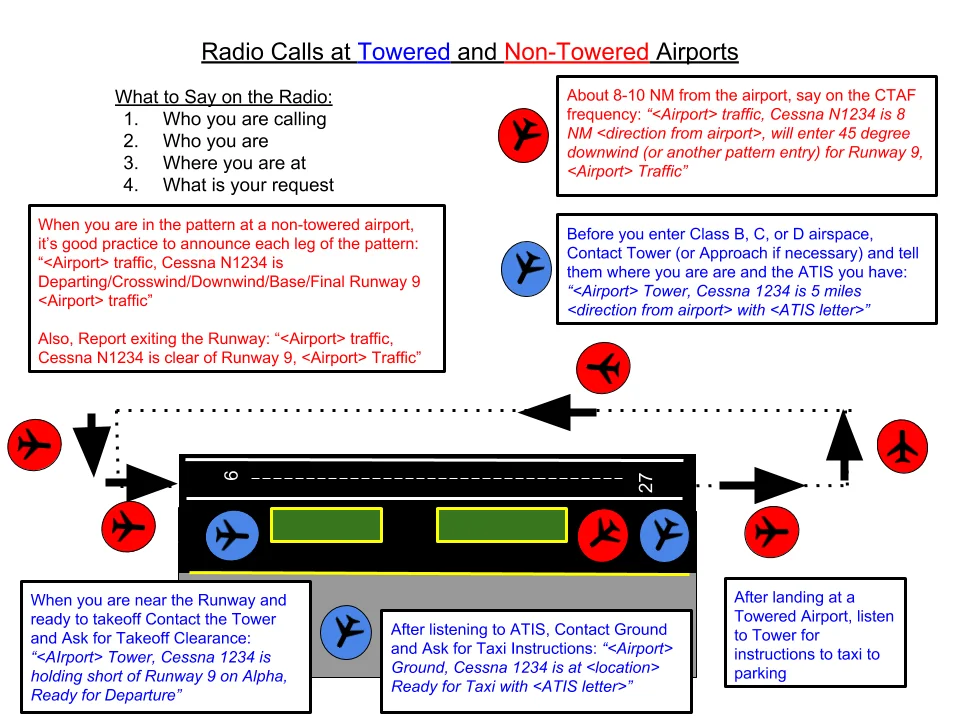
"Millville Traffic, Cessna November One Two Three Four Five, ten miles south, two thousand five hundred, inbound landing runway two-seven, Millville."
Entering the pattern:
"Millville Traffic, Cessna Three Four Five, entering left downwind runway two-seven, Millville."
Turning base:
"Millville Traffic, Cessna Three Four Five, left base runway two-seven, Millville."
Turning final:
"Millville Traffic, Cessna Three Four Five, final runway two-seven, Millville."
After landing — clearing the runway:
"Millville Traffic, Cessna Three Four Five, clear of runway two-seven, Millville."
Why you say the airport name twice: CTAF calls always begin and end with the airport name. This is because pilots at different airports may share the same frequency — hearing the airport name at the end confirms this call was for your airport, not another airport sharing the frequency.
The complete non-towered arrival sequence — every call you make
Arriving at a non-towered airport requires proactive self-announcement so other traffic can build a mental picture of your position. Here is the complete sequence from 10 miles out to the ramp:
- 10 miles out (initial call): "Provo Traffic, Cessna 12345, ten miles to the southeast, inbound for landing, Provo." — This tells everyone your call sign, where you are, that you're inbound, and repeating the airport name at the end confirms you're talking to the right traffic.
- Entering the 45° to downwind: "Provo Traffic, Cessna 12345, entering 45 to the left downwind, runway 13, Provo."
- Turning downwind: "Provo Traffic, Cessna 12345, left downwind, runway 13, Provo."
- Turning base: "Provo Traffic, Cessna 12345, turning left base, runway 13, Provo."
- Turning final: "Provo Traffic, Cessna 12345, turning final, runway 13, Provo."
- Clear of the runway: "Provo Traffic, Cessna 12345, clear of runway 13, Provo." — lets pattern traffic know the runway is clear.
Departing a non-towered airport
- Before taxiing: "Provo Traffic, Cessna 12345, taxiing to runway 13 via taxiway Alpha, Provo." — lets anyone in the pattern know ground traffic is moving.
- Before taking the runway: "Provo Traffic, Cessna 12345, departing runway 13, straight-out departure, Provo." — or "remaining in the pattern" if staying in the pattern.
- Departing the pattern: "Provo Traffic, Cessna 12345, departing the area to the northwest, Provo." — lets other traffic know you're leaving.
When no other traffic is present, it may feel like you're talking to yourself. You are — but you're also talking to anyone within radio range who is monitoring CTAF without transmitting. Transient traffic, someone approaching from the other side of the airport, a helicopter operating nearby — all benefit from hearing your position even if they don't respond.
When CTAF is also MULTICOM
At airports without a published CTAF frequency (very small or private airports), pilots use MULTICOM: 122.9 MHz. Use the same self-announce format with the airport name, since multiple airports may use this frequency in the same area. Identify the airport clearly in every call: "Heber City Traffic" not just "traffic."
NORDO traffic — not everyone is talking
CTAF self-announcement only works for aircraft that have it. Gliders, many ultralights, and some vintage taildraggers fly without an electrical system or radio at all — they’re NORDO (no radio). At a non-towered airport, you cannot assume silence on CTAF means an empty pattern. Keep looking outside and flying the standard pattern exactly as published; a predictable pattern is what lets a NORDO pilot anticipate where you’ll be, since they can see you but can’t hear you and you likely won’t hear them either.
This is also why CTAF calls are advisory, not clearance — nobody is approving your entry to the pattern the way a tower controller would. “See and avoid” remains the operating principle at every non-towered field, radio or no radio.
Lesson 4 — Towered Airport Radio Sequence
At airports with an operating control tower, you must establish radio contact and receive instructions from ATC before entering the movement area (taxiways and runway) and before taking off or landing. The sequence follows a logical flow through three ATC facilities: ground control (for surface movement), tower (for runway operations), and approach/departure control (for IFR or VFR flight following).
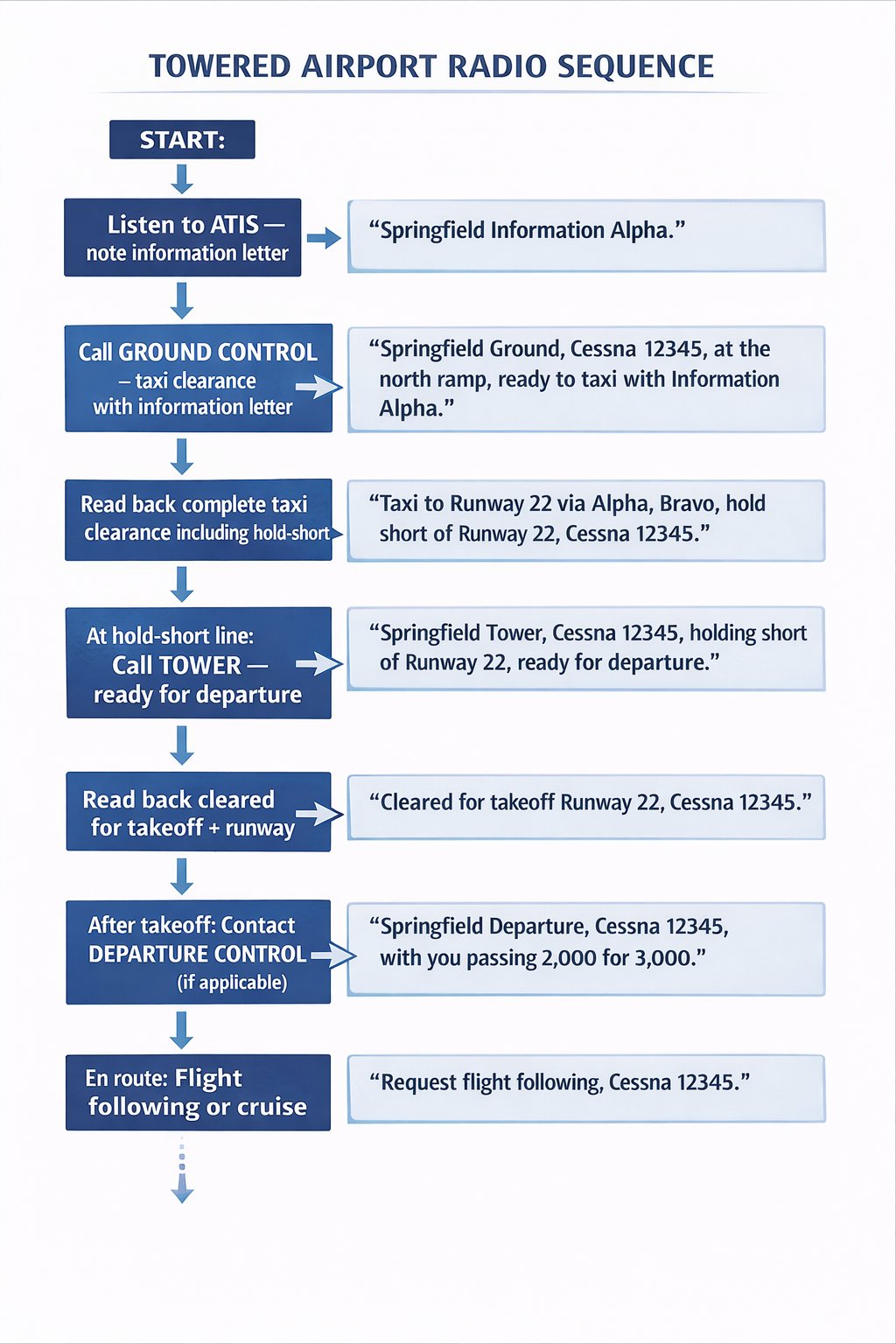
2. Call Ground Control for taxi:
YOU: "Springfield Ground, Cessna November One Two Three Four Five, at the terminal ramp, VFR to Kansas City, with information Bravo, request taxi."
ATC: "Cessna Three Four Five, taxi to runway two-seven via taxiway Alpha, hold short of runway one-eight."
YOU: "Taxi runway two-seven via Alpha, hold short one-eight, Cessna Three Four Five."
3. At hold-short line, call Tower:
YOU: "Springfield Tower, Cessna Three Four Five, holding short runway two-seven, ready for departure."
ATC: "Cessna Three Four Five, runway two-seven, cleared for takeoff, wind two-seven-zero at one-two."
YOU: "Cleared for takeoff runway two-seven, Cessna Three Four Five."
4. After takeoff, Tower may hand you off:
ATC: "Cessna Three Four Five, contact Kansas City Departure one one niner point one, good day."
YOU: "One one niner point one, Cessna Three Four Five, good day."
Mandatory readbacks
Certain ATC instructions must always be read back — not just acknowledged with "roger." These are:
- Runway assignments (for takeoff or landing)
- Hold-short instructions ("hold short of runway two-seven")
- Cleared for takeoff / cleared to land
- Altimeter settings
- Heading, altitude, or speed assignments in Class B, C, or D airspace
- Any safety-critical instruction
Reading back confirms you received the correct instruction. "Roger" alone does not confirm the specific content — only that you heard something. A runway incursion where the pilot read back a wrong runway is far more catchable than one where the pilot just said "roger."
ATC: "Cessna Three Four Five, Springfield Approach, radar contact, expect the visual approach runway two-seven, report four-mile final."
YOU: "Report four-mile final runway two-seven, Cessna Three Four Five."
[on final...]
YOU: "Springfield Approach, Cessna Three Four Five, four-mile final runway two-seven."
ATC: "Cessna Three Four Five, contact tower one two one point three."
YOU: "One two one point three, Cessna Three Four Five."
YOU: "Springfield Tower, Cessna Three Four Five, four-mile final runway two-seven."
ATC: "Cessna Three Four Five, runway two-seven, cleared to land, wind two-eight-zero at eight."
YOU: "Cleared to land runway two-seven, Cessna Three Four Five."
The complete towered airport arrival — every frequency, every call
Arriving at a Class D or Class C towered airport involves three separate ATC facilities in sequence, each with a specific role. Understanding each role helps you know what to expect and what to say:
Step 1 — Get ATIS (before any other call): Tune the ATIS frequency (published on the sectional or in the Chart Supplement). Copy information letter, altimeter, active runway, and weather. Set altimeter.
Step 2 — Call Approach Control (at Class C airports) or Tower directly (at Class D):
Class C: "Provo Approach, Cessna November One Two Three Four Five, ten miles southeast, five thousand five hundred, inbound for landing, information Foxtrot."
Approach responds, may assign a squawk code, radar vectors, or traffic advisories.
Step 3 — Tower handoff: Approach will tell you "Contact Provo Tower, 119.7." Switch frequencies immediately and check in:
"Provo Tower, Cessna 12345, five mile final, runway 13 [or 'as assigned']."
Tower issues landing clearance. Read back runway and clearance. "Cleared to land, runway 13, Cessna 12345."
Step 4 — Ground Control: After landing and clearing the runway, Tower will say "Contact Ground" or "Taxi to [location] via [taxiway], contact Ground on 121.7."
"Provo Ground, Cessna 12345, clear of runway 13, request taxi to transient parking."
Ground issues taxi instructions. Read back hold-short instructions with runway numbers.
Departing a towered airport — the sequence
Step 1 — Get ATIS before doing anything else. Altimeter setting, active runway, departure runway.
Step 2 — Call Ground: "Provo Ground, Cessna 12345, at the ramp, VFR to [destination], with information Golf, request taxi."
Ground issues taxi clearance with routing. Write it down. Read back every hold-short instruction.
Step 3 — Call Tower when ready: At the hold-short line: "Provo Tower, Cessna 12345, runway 13, ready for departure, VFR [direction or destination]."
Tower clears you or asks you to hold short. If cleared: "Cleared for takeoff, runway 13, Cessna 12345." Read it back.
Step 4 — Departure Control: If assigned a departure frequency, contact them after takeoff at or above 500 ft AGL or as directed.
Handling a "say again" — when you didn't catch ATC instructions
Every pilot — including airline captains with thousands of hours — occasionally asks ATC to repeat an instruction. The correct phrase: "Say again" (not "repeat" — in some countries, "repeat" is a military code for firing again). If you only missed part of the transmission: "Say again last [part]" or "Say again the runway assignment."
If ATC speaks too fast: "Cessna 12345, speak slower please." If you're unsure about a clearance: "Cessna 12345, request clarification — did you say [what you thought you heard]?" Never pretend to understand an instruction you didn't catch. The consequence of acting on a misunderstood clearance is far worse than the minor embarrassment of asking ATC to repeat.
Lesson 5 — VFR Flight Following
VFR flight following is a free, optional radar traffic advisory service provided by ATC to VFR pilots. It does not change VFR rules, minimums, or pilot-in-command authority — but it provides traffic call-outs, weather advisories, routing assistance, and a safety net for the entire flight. Highly recommended for any cross-country flight.
ATC: "Cessna One Two Three Four Five, go ahead."
YOU: "Cessna November One Two Three Four Five, Cessna one-seven-two, departing Olathe to Springfield, VFR at six thousand five hundred, request flight following."
ATC: "Cessna Three Four Five, squawk four five two one, ident."
YOU: "Squawking four five two one, ident, Cessna Three Four Five."
ATC: "Cessna Three Four Five, radar contact three miles east of Olathe, altimeter two niner eight two. Traffic twelve o'clock, five miles, eastbound, altitude unknown."
YOU: "Traffic in sight, Cessna Three Four Five." (or "Negative contact, Cessna Three Four Five.")
During flight following: respond promptly to traffic calls, report position changes if ATC asks, and advise when you want to cancel (if you don't want the service anymore) or when landing. At the destination: "Cessna Three Four Five, canceling VFR flight following, landing Springfield."
How to request flight following — the exact call
Flight following is requested from Center (en-route) or Approach Control (near airports). Find the appropriate frequency in ForeFlight, Garmin Pilot, or the sectional chart (Center frequencies appear in blue boxes on sectionals, labeled with the facility name and frequency). The initial call:
"Denver Center, Cessna November One Two Three Four Five, request flight following."
ATC responds with instructions — usually a squawk code and confirmation of services. Once you have a squawk code and ATC says "radar contact," flight following has begun. If ATC is too busy, they may say "Unable flight following, workload" — which means try again in a few minutes or accept the flight without it.
What flight following does and doesn't do for you
What you get: Traffic advisories ("traffic, 2 o'clock, 5 miles, 6,500 feet, a Cirrus, same direction"), weather advisories, routing help if you get confused, and a safety net — if you stop responding, ATC will try to reach you and eventually initiate a search if needed.
What you don't get: Guaranteed separation from other VFR traffic. ATC provides advisories on a workload-permitting basis. "Traffic not in radar contact" means they don't know where everything is. You are still responsible for see-and-avoid. Flight following does not change any VFR rules, minimums, or PIC authority. You can deviate from assigned headings or altitudes for safety — just tell ATC what you're doing.
Handoffs — what happens as you cross Center boundaries
Center airspace is divided into sectors. As you fly cross-country, you'll be handed between sectors and between Center facilities. ATC initiates: "Cessna 12345, contact Denver Center, 132.45." Switch immediately and check in with your call sign and altitude: "Denver Center, Cessna 12345, level 7,500." The new controller picks up your flight following automatically — you don't need to re-request it.
Near your destination, Center will hand you to Approach Control or instruct you to change to advisory frequency. "Cessna 12345, 10 miles from Provo, squawk VFR, frequency change approved, have a good flight." At this point, flight following has ended. If you want traffic advisories for the approach and landing at a towered airport, contact Approach before squawking VFR.
Canceling flight following
You can cancel flight following at any time. Common reasons: you've reached VFR-only terrain where Center has no radar coverage, you want to fly a low-altitude sightseeing detour, or you're landing at a non-towered airport outside ATC radar coverage. The call: "Denver Center, Cessna 12345, request to cancel flight following at this time." ATC confirms cancellation. Squawk VFR (1200) after cancellation unless instructed otherwise.
Flight following is not a Class B clearance
This trips up more student pilots than almost any other flight-following nuance: receiving VFR flight following — even with a squawk code and “radar contact” — does not authorize you to enter Class B airspace. Class B requires an explicit, individual clearance (“Cessna 345, cleared into the Class Bravo airspace”), not just radio contact or a transponder code. If a flight-following handoff happens to route you toward a Class B shelf, you must still hear those specific words before crossing the boundary — otherwise hold outside it, even while ATC is actively talking to you on the same frequency. Class C and D airspace, by contrast, only require you to establish two-way radio contact, which flight following has already done — so the Class B rule is the one exception worth committing to memory.
Lesson 6 — Emergency Radio Procedures
An aviation emergency is any situation that threatens safety of flight and demands immediate attention. FAA regulations and aviation culture strongly encourage pilots to declare emergencies early and clearly — the consequences of an unnecessary declaration are minimal (paperwork, possibly an explanation), while the consequences of not declaring can be fatal.
MAYDAY — the distress call
![MAYDAY emergency call format card: MAYDAY MAYDAY MAYDAY — [Facility or Any Station] — [Aircraft ID] — [Nature of Emergency] — [Position] — [Altitude] — [Intentions] — [Souls on Board]. Set transponder 7700, transmit on 121.5 MHz.](../images/m09-mayday-format.png)
MAYDAY is the international distress signal for a life-threatening emergency requiring immediate assistance. It is transmitted three times followed by all relevant information. Say it clearly, without hesitation. Every controller who hears MAYDAY immediately clears the frequency and provides maximum assistance.
If you cannot reach ATC on your assigned frequency: switch to 121.5 MHz (the international emergency/guard frequency, monitored by all ATC facilities and many aircraft) and transmit. Set your transponder to 7700. Both actions simultaneously alert the entire ATC system to your situation.
PAN-PAN — the urgency call
PAN-PAN (pronounced "pahn-pahn," rhymes with "don") is one step below MAYDAY — used for urgent situations that require priority assistance but are not immediately life-threatening. Examples: getting lost, a passenger having a medical issue, or mechanical problems that are serious but not yet emergencies. Format is the same as MAYDAY but uses "PAN-PAN, PAN-PAN, PAN-PAN" instead.
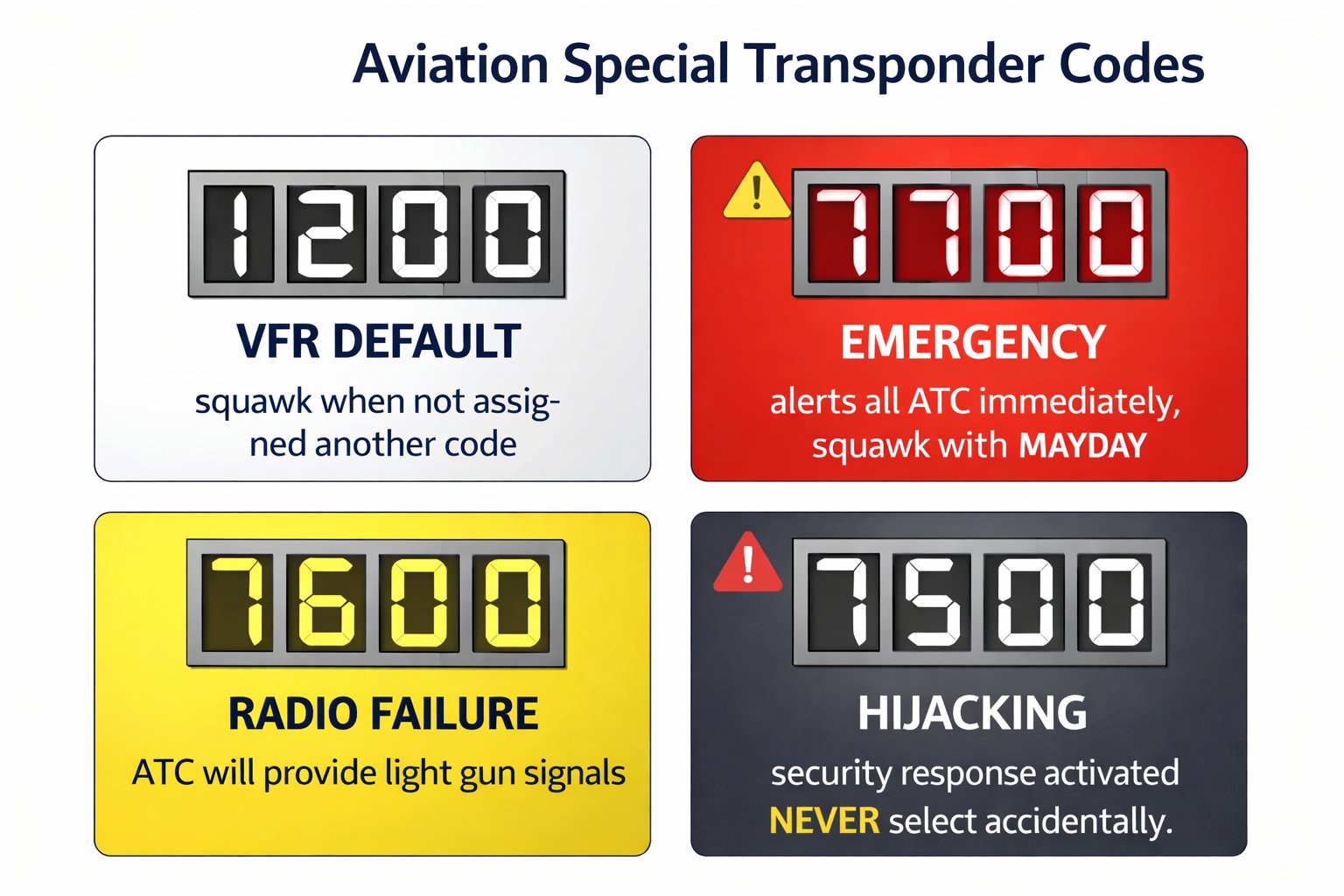
Transponder emergency codes
| Code | Situation | Notes |
|---|---|---|
| 1200 | VFR flight — default | Set when no other code assigned. All VFR aircraft not receiving flight following. |
| 7700 | Emergency | Immediately alerts all ATC facilities. Set simultaneously with MAYDAY call if possible. |
| 7600 | Radio failure | Lost two-way communications. ATC will look for 7600 and provide light gun signals. |
| 7500 | Hijacking | Triggers immediate security response. Never select accidentally. |
Radio failure procedures: If you lose radio communications at a towered airport, squawk 7600 and watch for light gun signals from the tower. In the pattern: steady green = cleared to land, flashing red = airport unsafe/go elsewhere, alternating red/green = exercise extreme caution. Land, then flash your landing light to acknowledge signals.
- Phonetic alphabet: Alpha through Zulu — know all 26 cold. Numbers spoken digit-by-digit. "Niner" for 9. Headings always 3 digits.
- Radio formula every time: Who you are calling → Who you are → Where you are → What you want.
- Always listen to ATIS before calling ATC at towered airports. Include information letter in your first call.
- CTAF: self-announce at 10 miles, entering pattern, base, final, and clear of runway. Say airport name first and last.
- Towered airports: ground control for taxi, tower for runway operations, approach/departure for en route.
- Mandatory readbacks: runway assignments, hold-short instructions, cleared for takeoff/landing, altimeter settings.
- Flight following: free VFR radar service. Give aircraft type, departure, destination, altitude in your request. Squawk assigned code.
- MAYDAY (life-threatening): transmit 3 times + emergency details. Squawk 7700. Use 121.5 if needed.
- PAN-PAN (urgent, not life-threatening): one step below MAYDAY. Requests priority handling.
- Transponder codes: 1200=VFR, 7700=emergency, 7600=radio failure, 7500=hijacking (never accidentally).
Lesson 7 — Readbacks, Common Mistakes, and Lost Comms
What you must always read back
ATC requires verbatim readbacks of certain clearances to confirm receipt. Required readbacks include runway assignments, hold-short instructions (always include the runway number), takeoff and landing clearances, altitude assignments in controlled airspace, heading and speed assignments, and frequency changes.
Common radio mistakes to avoid
Stepping on transmissions — if you transmit while someone else is, neither gets through. Listen before keying. Too long — state the four elements and stop; ATC asks if they need more. Saying "Roger" for clearances — "Roger" means message received, not compliance confirmed. Read back the instruction. Forgetting information code — always tell Ground or Tower which ATIS letter you have. Using "yeah" or "nope" — aviation communications use "affirmative" and "negative."
Lost communications procedure — towered airports
If radio contact fails at a towered airport: (1) Squawk 7600 immediately — this signals radio failure to ATC. (2) Try receiving on another frequency — guard (121.5), ATIS, or a previous frequency. (3) Watch for light gun signals from the tower. (4) Rock your wings to acknowledge signals in flight; flash landing light on the ground. (5) If no contact after a reasonable attempt, depart safely and call ATC by phone after landing.
Light gun signals
Light guns are the tower's backup communication tool when radio fails. Know these cold — they appear on both the written test and the oral exam.
Phraseology that trips up student pilots — the exact words that matter
Aviation communication has specific required phrases that aren't always intuitive. Here are the most important ones and why they matter:
- "Wilco" = will comply. Used when you acknowledge an instruction and intend to follow it. More specific than "Roger."
- "Unable" = cannot comply. Always explain why if possible: "Unable immediate climb, terrain." ATC will find an alternative.
- "Negative" = no. Not "nope" or "that's wrong." "Negative, we have not received the ATIS."
- "Affirmative" = yes. Not "yeah" or "correct."
- "Immediately" = do it right now, no hesitation. When ATC says "turn left immediately," they see traffic. Turn first, ask questions after.
- "Go around" = if Tower tells you to go around, execute the maneuver immediately. This is a command, not a suggestion.
- "Cleared for the option" = authorized to touch-and-go, stop-and-go, full stop, or low approach — your choice. Common at training airports.
Stuck microphone — one of the most disruptive radio failures
A stuck microphone (keyed transmitter) blocks the entire frequency — no one can transmit while your mic is stuck. If you press the PTT (push-to-talk) button and it sticks, you're transmitting continuously. ATC will hear only static and won't be able to reach you or other aircraft. Signs your mic is stuck: your radio's TX light stays on continuously, you hear your own voice or cockpit noise in your headset, and other traffic sounds strangely absent.
Fix: physically toggle the PTT button, check for any item pressing against the button (kneeboard, checklist, yoke), try the alternate PTT if equipped. If you can't unstick it, turn off the radio — a silent frequency is better than a blocked one. Then switch to an alternate radio or squawk 7600 to indicate communication failure.
Handling an unexpected clearance — when ATC surprises you
ATC sometimes issues clearances you weren't expecting — "turn left, heading 270, vectors for traffic" or "descend and maintain 3,500, expect ILS 16R." Don't let the surprise cause you to read back incorrectly or fail to read back at all. The protocol:
- Write down what you heard (on your kneeboard or knee) as ATC says it
- Read back what you wrote: "Left heading two seven zero, descend three thousand five hundred, Cessna 12345"
- Then comply — turn and descend after the readback
- If you didn't catch something: "Say again the altitude assignment, Cessna 12345"
Never comply with an instruction you're not sure about without confirming it. The 3 seconds it takes to say "say again" is worth far more than flying the wrong heading or descending to the wrong altitude.